Cycle tracking and phase
Use the cycle tracker to inspect a repeating section of a waveform, and phase correlation to compare how two signals relate over time. Both tools are available from show → Analyser:.
Follow a waveform cycle
- Keep the waveform visible and turn Scroll off in the duration menu.
- Open show → Analyser: and enable Wav cycle tracker.
- Move the pointer over a repeating part of the waveform.
The tracker highlights a detected cycle and displays its estimated note, frequency and peak level. Move along a kick's tail to see how its cycle length changes. For a kick and bass comparison, inspect the late kick cycles and a stable part of a bass note separately.
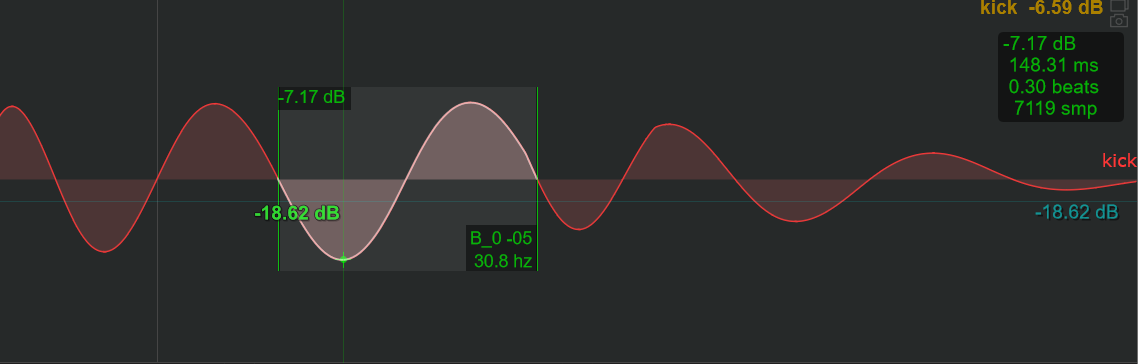
If no cycle is highlighted, try a clearer periodic section, zoom in, and check that the pointer is inside the waveform area. A noisy attack or a very quiet tail may not provide a usable cycle.
Compare phase relationships
Enable Phase correlation in show → Analyser:. Keep the waveform visible and use the fixed view with Scroll off.
| Display mode | Signals compared |
|---|---|
| sum | Left and right of the sum |
| Individual sound | Left and right of that sound |
| layers or stack | Mono components of the first two enabled sounds in the group |
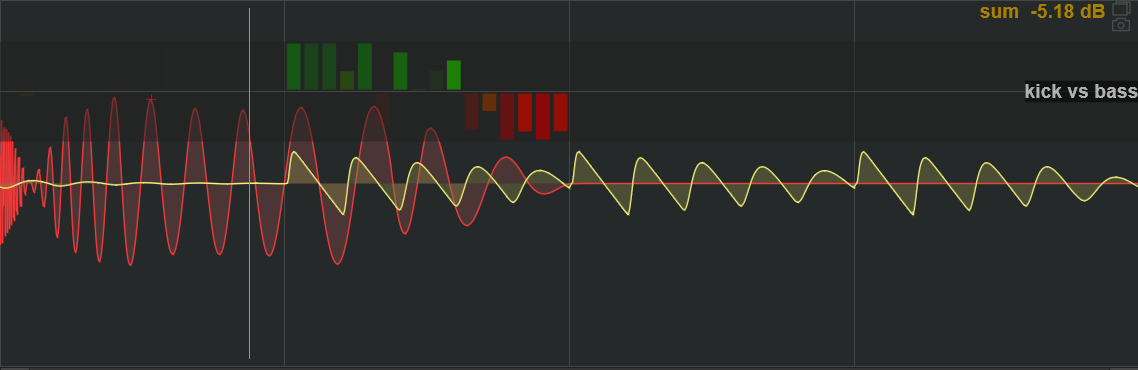
The bars show correlation across the displayed interval: positive values extend toward green, negative values toward red. Read the pair's names in the display to confirm which signals you are comparing.
For the kick and bass example, use layers with Kick and Bass as the first two enabled sounds. Inspect the part where the first bass note overlaps the kick tail, then compare it with the waveform shapes and the sum view.
For an A−B difference display, see Delta comparison.