Stereo analyser
The Stereo analyser plots the distribution of a sound across the stereo field. It can show several sounds together, making it useful for comparing their placement and spread.
Open the analyser
- Enable the FFT area, for example with FFT+ to keep waveforms visible above it.
- Open show → Analyser:.
- Enable Stereo analyser. The stereo distribution takes the place of the ordinary spectrum curves.
- Choose an individual sound, sum, layers or stack for the comparison you want to inspect.
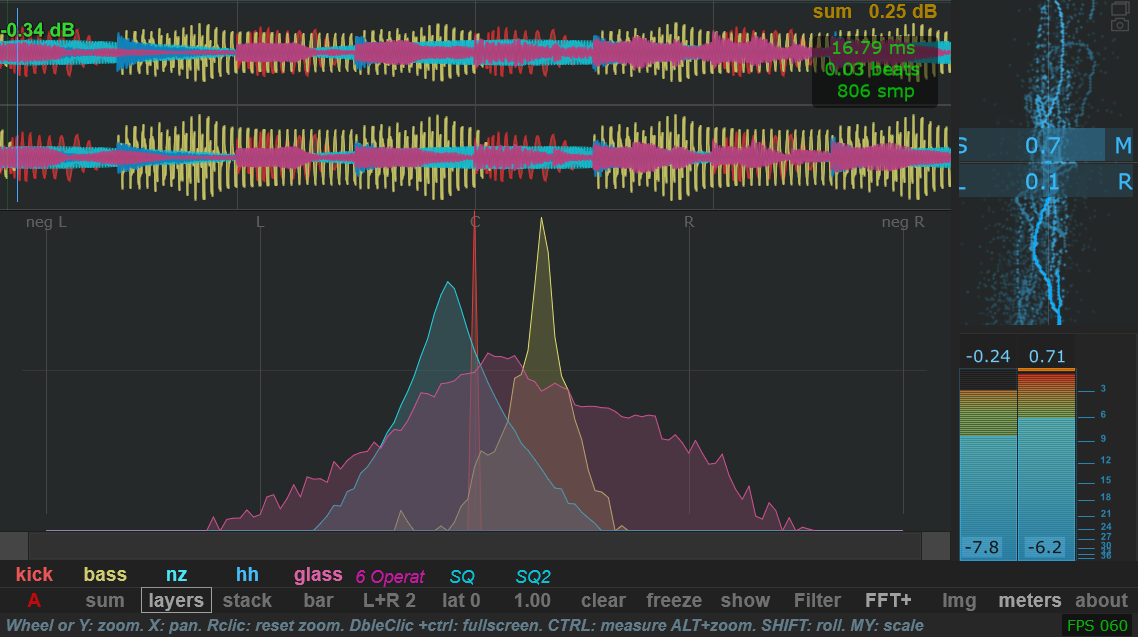
Read and adjust the view
The horizontal guides are labelled neg L, L, C, R and neg R. The vertical scale shows level. Compare where each sound's distribution is concentrated, and how far it extends across the view.
The analyser's min and max controls set its dB display range. nb samples changes the amount of recent signal included in the distribution. Keep these settings consistent when comparing sources.
For example, compare a centred kick and bass with a wider percussion or texture track. Select sounds individually if overlapping distributions become difficult to read.
Use the side-panel stereo views
The meters panel provides additional Lissajous, polar and spectral views. These can stay beside the main display. See the five correlometer modes for their purposes and selection.