Measure a waveform region
Use Measure to read the position and duration of a region directly in the waveform view. For a stable example, select one sound and freeze the display before measuring.
Select a region
- Hold Alt, then press the left mouse button in the waveform view.
- Keep the button held and drag across the region. Two vertical boundaries, a horizontal arrow and a data box appear while you drag.
- Read the values before releasing the mouse button. With Alt, releasing zooms the horizontal view to the selected interval and closes the measurement overlay.
Hold Ctrl instead of Alt to measure without zooming on release. The overlay still closes when you release the mouse button. Right-click in the waveform view to reset the horizontal zoom.
Read the measurements
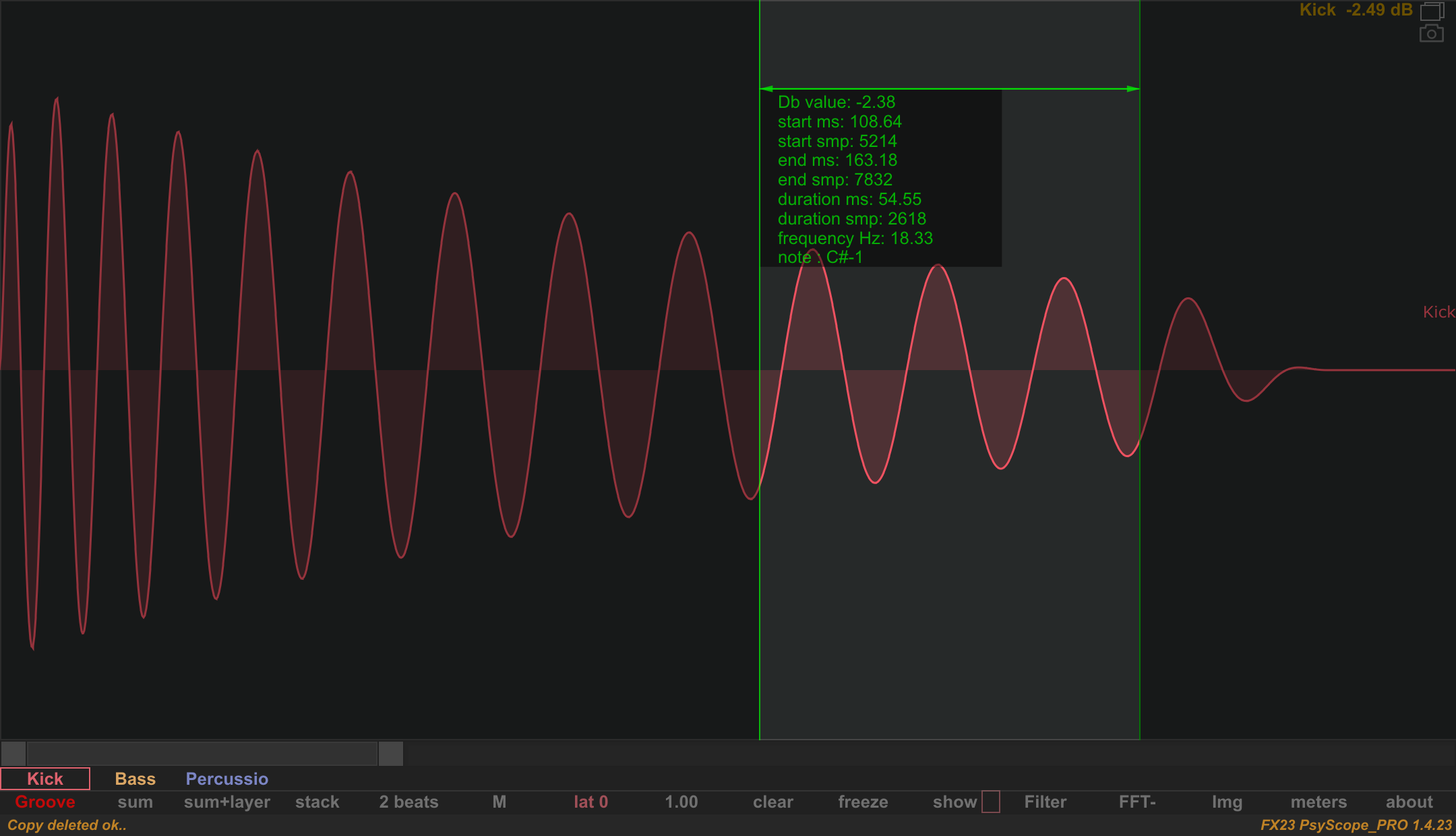
The native example shows an Alt selection held over a wider part of the Kick tail, from approximately 108.64 ms to 163.18 ms. All nine readouts are visible in the data box.
| Readout | Meaning |
|---|---|
Db value |
The amplitude in dB corresponding to the selection's upper edge on the waveform scale. It is a vertical reference, rather than a peak or RMS analysis of the selected audio. |
start ms, start smp |
Start position in milliseconds and samples within the displayed analysis buffer. |
end ms, end smp |
End position in milliseconds and samples within that buffer. |
duration ms, duration smp |
Time between the two boundaries, in milliseconds and samples. |
frequency Hz |
The reciprocal of the selected duration: the frequency of a cycle with that length. |
note |
The note name derived from that duration-based frequency. |
To estimate a waveform's frequency, select one complete cycle between equivalent points, such as two successive upward zero crossings. Selecting several cycles or a whole transient makes the frequency and note describe that entire interval; they do not identify its dominant spectral frequency. Use the cycle tracker for automatic cycle detection, or the spectrum to inspect frequency content.
Zoom in before selecting a short cycle, and use the sample readouts to inspect the interval precisely. The example's roughly 54.55 ms region spans several cycles, so its duration-based readout is about 18.33 Hz, rather than the Kick tail's approximately 55 Hz cycle frequency.