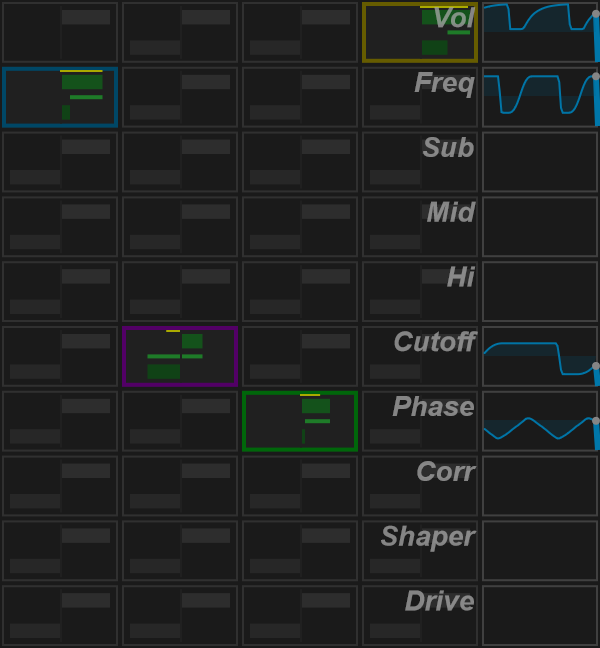
Modulation matrix
The matrix connects four source columns to destination rows. Columns are Lfo1, Lfo2, Rec and Env. Destinations are Vol, Freq, Sub, Mid, Hi, Cutoff, Phase, Corr, Shaper and Drive.
Make a connection
- Enable a source and set its shape or detector settings.
- Find its column and the destination row.
- Click the cell to enable the route.
- Adjust the upper and lower limits in that cell.
- Listen while changing the range, then toggle the route to compare.
The upper half controls the maximum and the lower half controls the minimum of the modulation range. These are routing limits, not a display of the destination's physical units.
Edit a range
Drag the corresponding half to change a limit. The mouse wheel also adjusts the upper or lower limit under the pointer. Right-click resets the selected limit to zero. The hover console describes middle-button shift/scale editing.
Ctrl + double-click resets the entire matrix, including active routes. Save a program before using this gesture if you want to keep the routings.
If nothing moves
Check that the source and route are enabled and that the range is not zero. For a processing destination, check that the relevant processor is active. For audio-driven sources, verify input or sidechain audio and detector settings.
Native interface captures
These images use the actual PsyPhaZ 1.1.05 editor with the same reproducible stereo audio example. Click an image to open it at full size.