Lanes and envelope
The lanes let you refine one part of a performance without recording the entire matrix gesture again.
What each lane controls
| Lane | Controls | Off behavior |
|---|---|---|
| SLICE | Slice choice | Natural slice order; pattern retained. |
| REPEAT | Retrigger interval | Recorded repeat pattern bypassed. |
| REVERSE | Direction per step | Forward playback; pattern retained. |
| DECAY | Envelope decay duration | Envelope bypassed; curve and settings retained. |
| FILE SEQ | Source over time | Return to the selected file. |
Draw directly in SLICE and REPEAT. In REVERSE, click to toggle a step and drag to paint that state; right-click clears steps.
Each lane has random and reset. Check the target before resetting: the matrix reset concerns source markers, whereas a lane reset concerns the sequence.
DECAY and ADSR
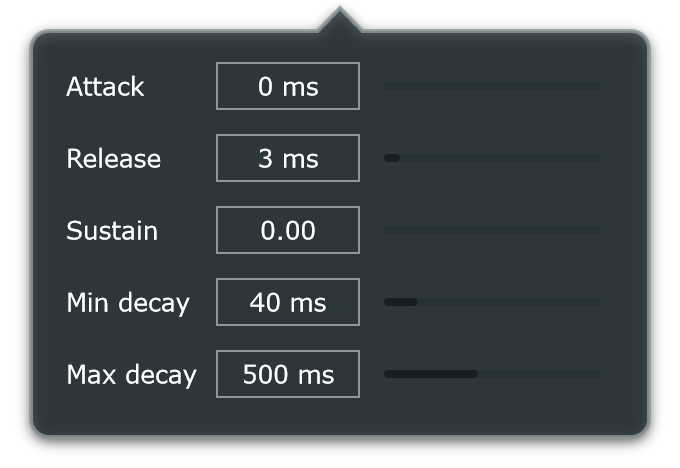
Open adsr to shape how each hit changes in volume.
| Control | What to listen for |
|---|---|
| Attack | How quickly a newly triggered hit rises. |
| Sustain | The level reached after decay. |
| Release | How the end of the hit fades. |
| Min decay / Max decay | The shortest and longest decay durations addressed by the lane. |
Draw the DECAY curve directly or hold its vertical fader during playback to record changes. The curve selects a duration between Min decay and Max decay. The slot's Decay multiplier can scale that duration further.
Enable the envelope to hear it. A high Sustain can make decay changes less obvious; try lowering Sustain before shortening the curve.
Make a phrase breathe
Start with a moderate decay range. Draw short values on busy repeats and longer values on a few accents. Compare ADSR On/Off without changing the recorded slice choices.
Random variations
random all changes Slice, Repeat, Reverse, Decay and File Seq together, respecting protected cells. auto prepares a variation at a workspace restart. The fast/slow control changes randomization behavior.
Use protection tools to retain a useful part of the phrase while varying the rest.