Audio slots and pitch
Each slot combines an audio source with its own playback settings. Use different slots when you want several treatments of the same loop.
Load, replace and clear
The library provides sixteen numbered slots. add loads audio; replace changes the selected source. clear empties a slot without deleting its file from disk. Empty or missing sources produce silence.
Drop supported audio onto a list row to target that slot. Selecting a file in List mode selects it for playback as well as editing; with Seq active, playback follows the file timeline.
Loop and section
Set Loop to the musical duration of the whole source, then choose its section. This describes the source; Workspace describes the pattern.
For example, start with a one-bar drum loop, 16 sl/bar and 16 slices. A four-bar source with that matrix size offers separate one-bar sections. Check Loop before compensating with Pitch: a wrong musical length changes tempo-fit speed.
Pitch behavior
| Control | Effect |
|---|---|
| Tempo Fit | Restore speed fitted to the current tempo, keeping transposition. |
| Original Pitch | Restore native source speed, keeping slider transposition. |
| Lock Pitch | Hold current speed against later tempo changes. Pitch remains adjustable. |
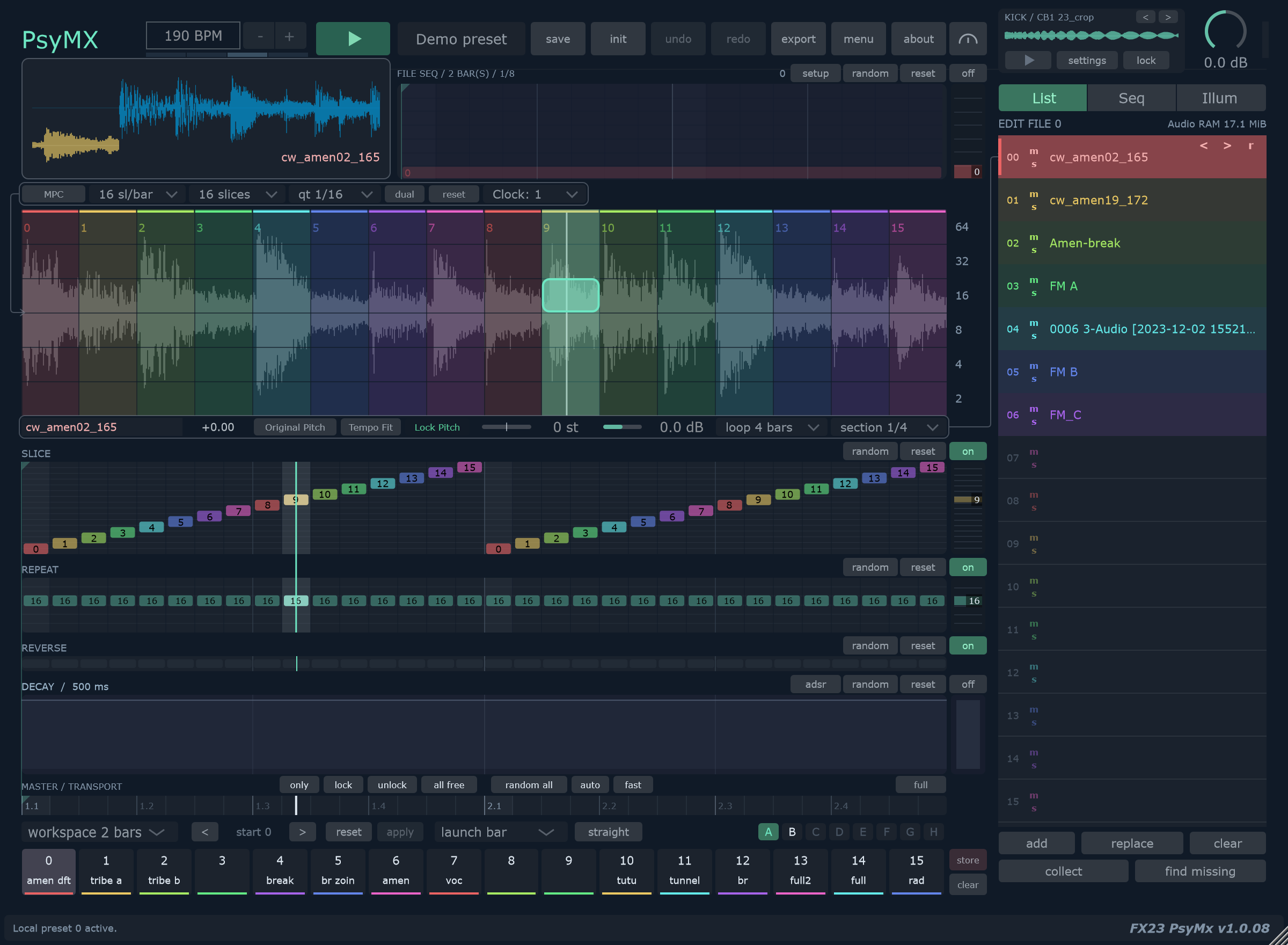
For native pitch that stays fixed when tempo changes, use Original Pitch, then Lock Pitch. To return to tempo-linked playback, turn Lock Pitch off and use Tempo Fit.
PsyMX changes playback speed rather than time-stretching. At slow trigger rates a slice may finish before the next hit; at fast rates the next hit may interrupt it.
Slot settings
Right-click a file row to open its settings.
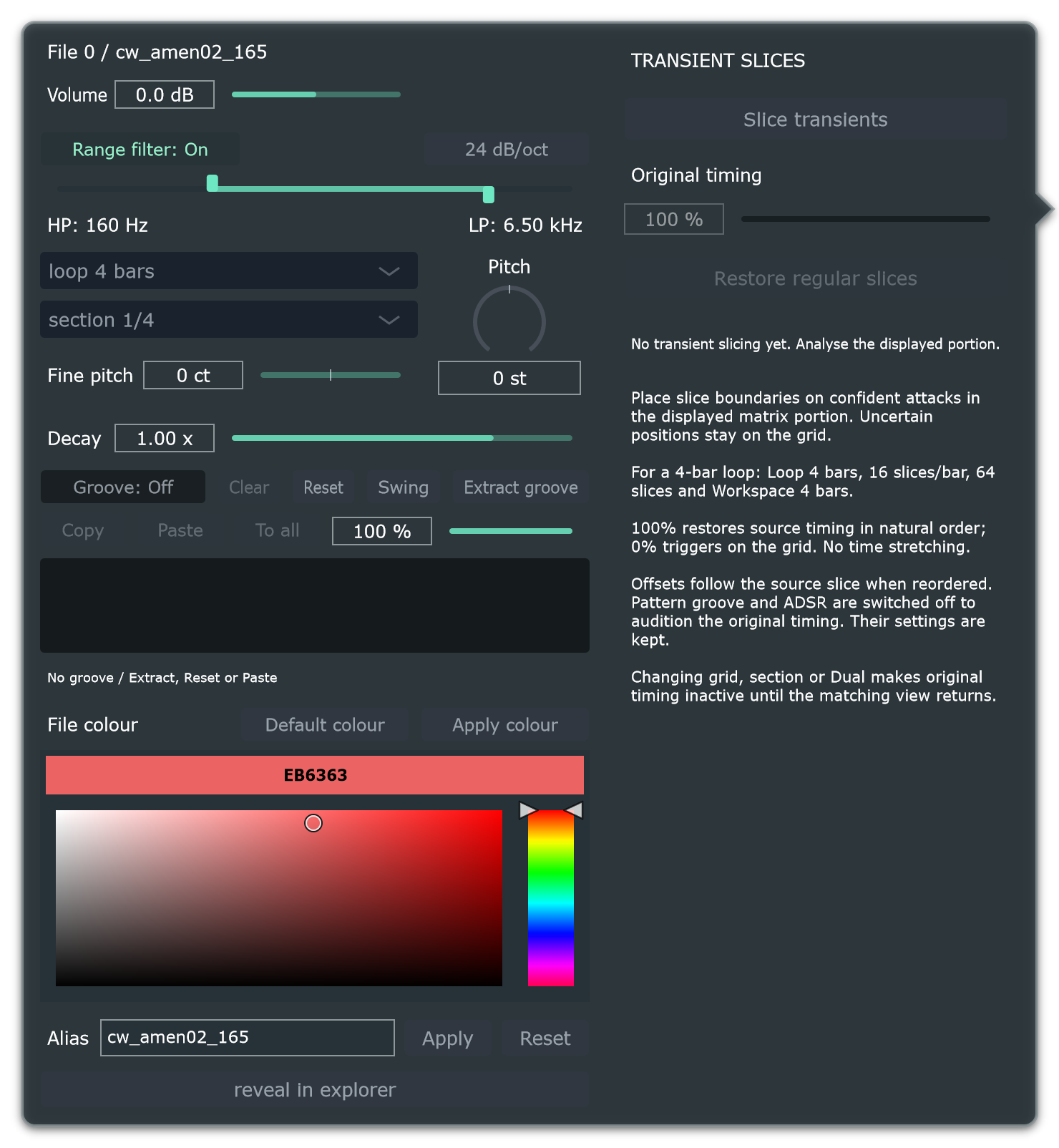
| Setting | Use it for |
|---|---|
| Volume | Balance the source against other slots. |
| Pitch / Fine pitch | Transpose in semitones, then tune in cents. Fine pitch adds −100 to +100 cents, including with Lock Pitch. |
| Decay | Multiply the workspace decay by 0.10–2.00. Editing this control enables ADSR. |
| Range filter | Limit the source to a frequency band with HP/LP bounds. |
| File colour | Make a source easier to follow in the list and file timeline. |
| Alias | Change the displayed name without renaming the file on disk. |
Range filter gestures
The left handle sets HP; the right sets LP. The logarithmic range is 20 Hz–20 kHz, with a common 12/24 dB/oct slope.
- Drag either handle to change one boundary.
- Drag the middle bar horizontally to move the band.
- Drag the middle bar up to widen or down to narrow it.
- Right-click the range to open it fully.
At 20 Hz, HP is bypassed; at 20 kHz, LP is bypassed. Turning the filter Off retains its settings. This slot filter does not process the separate kick.
Try narrowing a noisy percussion loop, then compare filter On/Off while the sequence continues.
Continue with Groove to change the slot's trigger timing.