Rec and Env options
Open these menus in the right panel: click the duration beneath Rec, or the + beneath Env. Clicking the Rec or Env name itself toggles that source. Both sources need an enabled route in the modulation matrix to affect a destination.
These are native PsyPhaZ 1.1.05 menus. Click a capture to view it at full size; displayed values are an example state.
Rec
The Recorder menu sets the duration of the recorded modulation loop. The grid contains one parameter, Sync. Select a value to change the loop’s tempo-related duration.
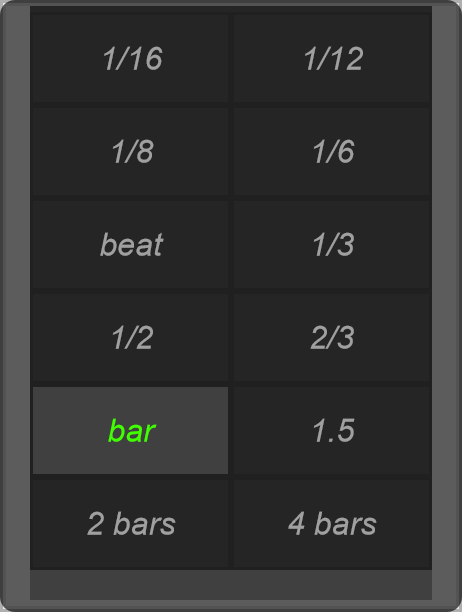
Choose the duration before recording a new gesture. Keep host transport playing, then hold and drag the Recorder’s vertical fader to write movement. Release to replay it. See the animated Recorder example.
Env
The envelope follower converts the level of an audio signal into modulation. Its pre-filter lets you focus detection on a frequency range; Attack and Release determine how quickly the resulting envelope follows changes.
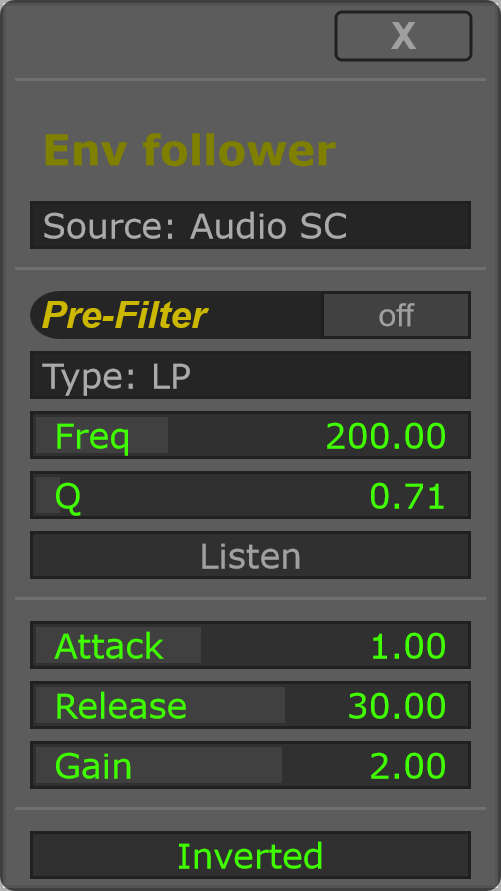
For a first test, choose Audio Self, disable Inverted and route Env to a destination. Adjust Gain for a useful modulation range, then Attack and Release for the desired movement. Enable Pre-Filter when only part of the signal should drive that movement.