SEQUENCER / NOTES
Notes, gates and velocity
A trigger starts a note. Its gate determines the note length; velocity supplies the note's performance level, while the pitch grid determines its note number. The separate volume row can shape amplitude when the sound's seq vol contribution is enabled.
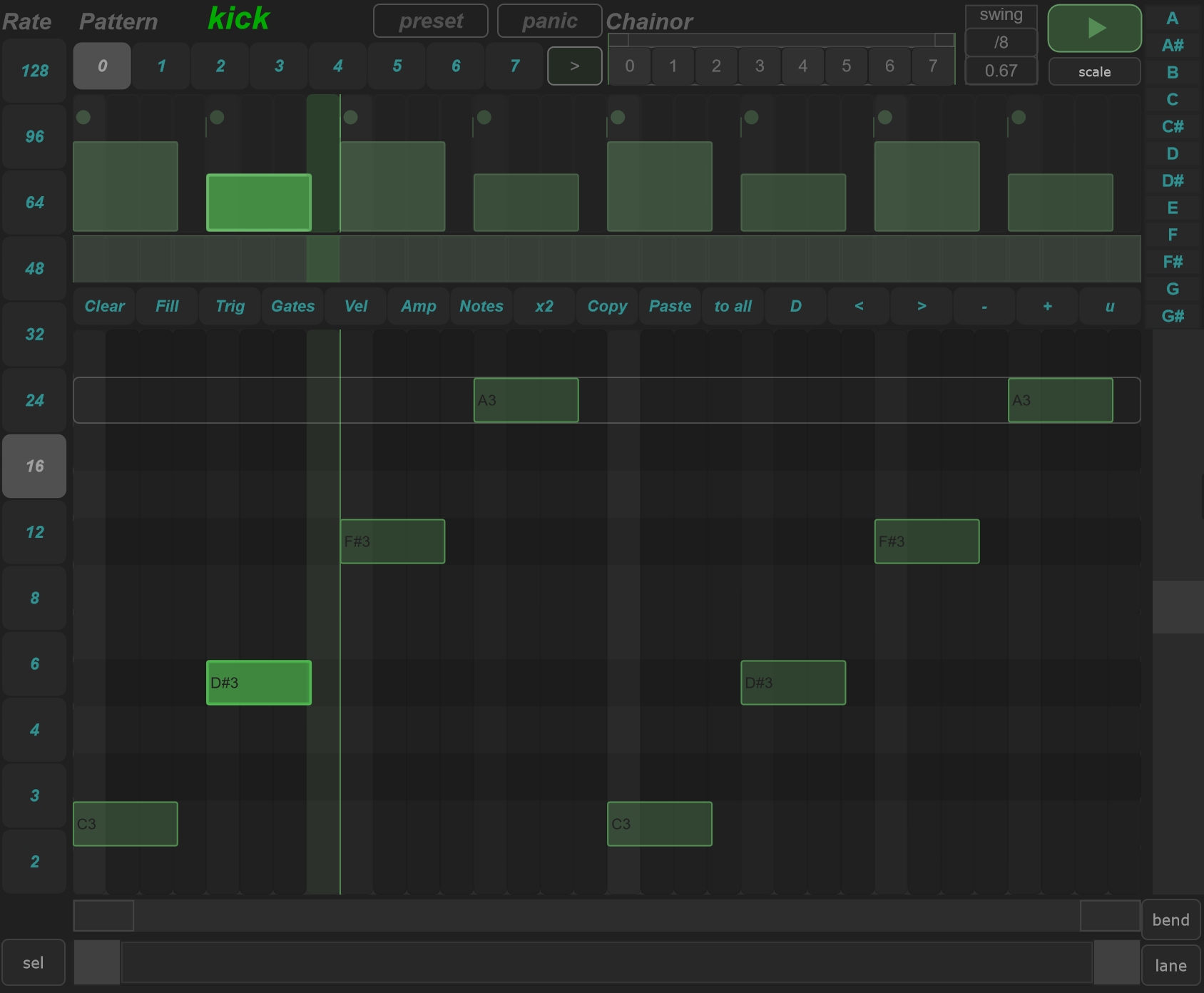
Draw and edit
| Area or gesture | Action |
|---|---|
| Left-click or left-drag the trigger row | Add triggers. |
| Right-click or right-drag the trigger row | Clear triggers. |
| Drag a gate/velocity bar horizontally | Change its gate length. |
| Drag the same bar vertically | Change velocity. |
| Middle-drag over gate/velocity bars | Draw velocities across steps. |
| Ctrl-drag the gate/velocity controls | Apply the adjustment across the active editing range. |
| Left-click empty space in the pitch grid, with sel and bend off | Insert a note at that time and pitch. Continue dragging to set its gate. |
| Right-drag notes in ordinary editing mode | Erase notes. |
The gate/velocity display reports velocity on a 0–127 scale. The resulting loudness also depends on the sound's velocity weight and amplitude settings. A note can have a long gate while a short amplitude envelope has already decayed to silence.
Use the piano-roll scroller to inspect other pitch registers. The timeline's horizontal zoom and the note-area vertical navigation change the view; they do not transpose notes.
Pattern tools
The tool strip provides operations on the current pattern and its selected loop region. Copy the pattern before applying several operations in succession.
| Tool | Operation |
|---|---|
| Clear | Clear the current pattern's note data. |
| Fill | Cycle through regular trigger/gate spacings in the loop region. Right-click cycles backwards. |
| Trig / Gates / Vel / Amp / Notes | Generate or randomize the corresponding data. Right-click uses the tool's reset behaviour. |
| x2 | Resample the pattern and advance its rate choice. This rewrites pattern data, including gate lengths; it is different from view zoom. |
| Copy / Paste | Copy pattern data and paste into the selected region. |
| to all | Copy the current pattern across the other patterns. |
| D | Repeat the loop section across the pattern. |
| < / > | Roll pattern data left or right. |
| − / + | Transpose note data down or up by one semitone; right-click moves by an octave. |
| u | Unpack overlapping gates. |
Some tools also include lane data, with right-click variants that omit lanes. Check the result in both panes after a bulk edit, especially after x2, Paste, to all or D.
A first rhythm
- Select an empty pattern and choose a rate.
- Add a few triggers, then audition them with a simple sound.
- Adjust gate lengths to hear the effect of note-off.
- Lower alternate velocities, with velocity contribution enabled in the sound.
- Change a few pitches in the grid.
- Copy the pattern before adding swing or generating variations.
Use selection mode when moving several notes together. Turn it off when returning to ordinary note insertion.