PARAMETERS EDITOR / CONTOUR
Envelopes and filtering
Use the amplitude section to control the level contour, the pitch section to control tuning movement, and the filter section to shape frequency content. Each has its own enable and modulation choices: editing a curve does not automatically select it as the active source for every destination.
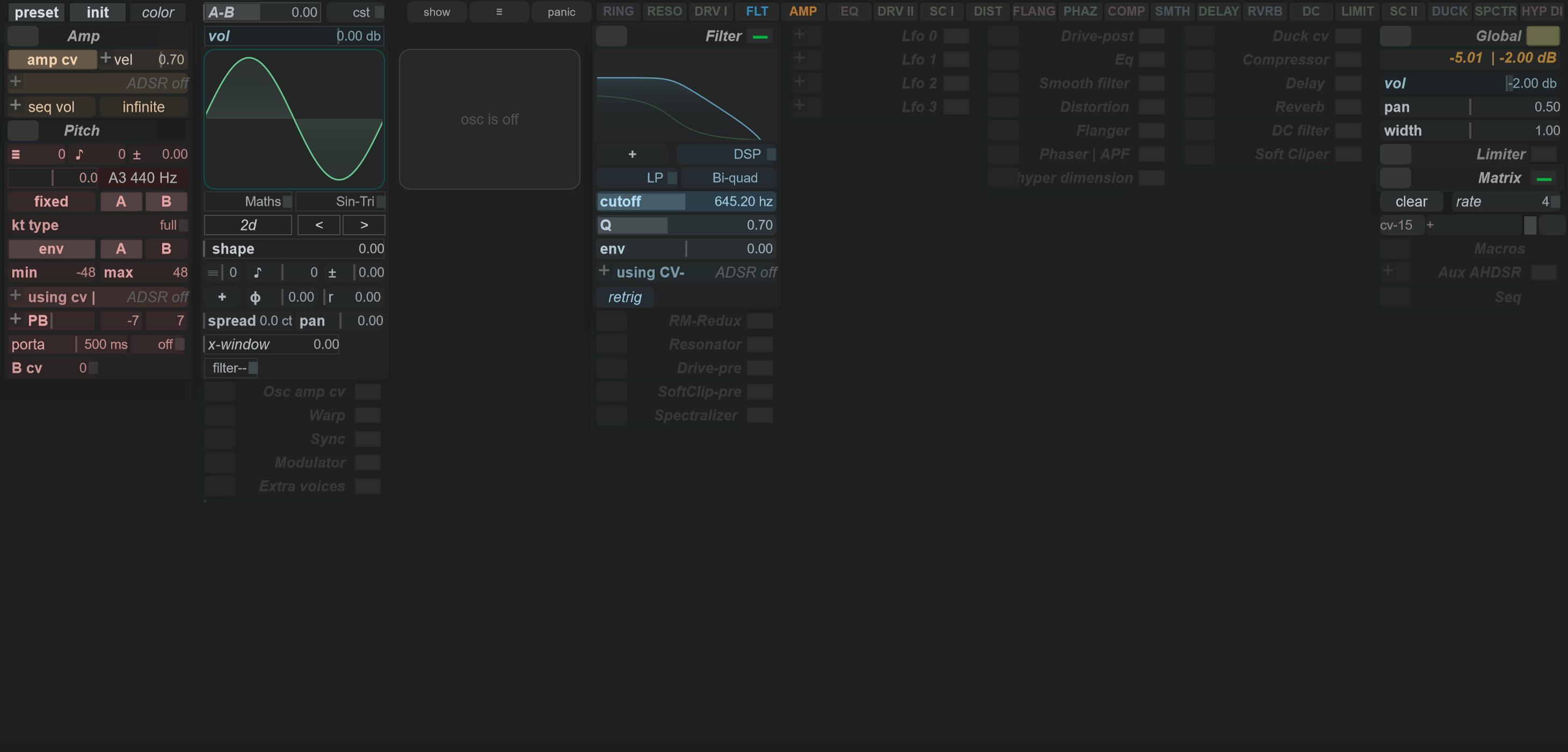
Amplitude
| Control area | Role and interaction |
|---|---|
| amp cv / using cv | Choose whether the amplitude curve contributes to the contour. Edit its shape in 1 Ampl. |
| ADSR section | Open the additional envelope controls, including attack, hold, decay, sustain and release. |
| Velocity weight | Set how much note velocity affects the level. A velocity pattern needs this contribution to be audible. |
| seq vol | Choose whether the sequencer's volume pattern contributes. This is separate from note velocity. |
| infinite / note-end behaviour | Determine whether note endings are ignored by the amplitude behaviour. Check this when a long gate or short note-off seems to have little effect. |
Attack, hold and decay describe the beginning of the ADSR contour; sustain describes its held level, and release the transition after the note ends. Additional level, shape and global-time controls refine that contour. Check the displayed units for each value rather than treating every envelope field as a duration.
To hear a release clearly, use a sustained note with a definite note-off. A short one-shot curve may already have fallen silent before a long release can matter.
Pitch
Set the base tuning and note-following choices before adjusting pitch modulation. The Pitch curve has minimum and maximum offsets that define its vertical pitch range; they are not the oscillator's waveform shape.
Pitch controls also include separate oscillator A/B participation, pitch-bend behaviour and portamento settings. A portamento time belongs to transitions between notes; changing it is different from drawing a pitch envelope within one note.
See Pitch minimum and maximum for the curve-range controls and their exact ranges.
Main filter
Enable the filter, choose its mode, then set cutoff and resonance/Q. Mode-specific controls can appear or disappear when you change the filter model. Use the numeric-entry dialog to inspect the current control's accepted range.
The cutoff establishes the filter's operating position. Resonance/Q changes its emphasis around the cutoff. The filter envelope/curve and modulation settings move that operating point; if a cutoff seems to change by itself, check those sources and the Sequencer's assigned lanes.
The 2 Filter curve supplies a time-varying shape when the corresponding filter-curve contribution is enabled. Its shape, destination depth and the base cutoff work together. Begin with a moderate depth, then move the base cutoff to place the sweep in a useful region.
A first contour
- Use one oscillator and enable the amplitude-curve contribution.
- Edit 1 Ampl into a short decay, then audition it.
- Enable the main filter and choose its mode.
- Set a base cutoff, then enable and adjust the filter-curve contribution.
- Edit 2 Filter, audition again, and compare with the filter bypassed.
The processing chain determines where the main filter sits relative to amplitude, drive and other stages. Moving it can change the result even when its own settings stay the same.